For a first robot or servo arm, the best microcontroller is an Arduino Uno R3 or a compatible board such as the ELEGOO UNO R3. Step up to a Mega 2560 for many joints and sensors, an ESP32 for Wi-Fi or Bluetooth control, or a Raspberry Pi 5 when the robot needs a camera, OpenCV or ROS 2, usually paired with a microcontroller.
The Uno wins for beginners because it uses 5V logic, has the deepest pool of arm tutorials, and gives you an easy path to a servo driver or a CNC shield. Clock speed rarely decides whether a build works. Three things matter more: how you drive the servos, whether your modules match the board’s logic voltage, and where the motor power comes from. Specs here come from the product listings. We haven’t hands-on tested the boards ourselves.
- First robot or 4-DOF servo arm: Uno R3. Next step: the Arduino robotic arm build.
- 5–6 joints plus sensors, encoders or a joystick panel: Mega 2560. Same code and libraries as the Uno.
- Phone or browser control: ESP32. Next step: the ESP32 robotic arm guide.
- Camera, AI or ROS 2: Raspberry Pi 5. Next step: the Raspberry Pi robotic arm guide.
As an Amazon Associate we earn from qualifying purchases. Prices and availability are accurate as shown on Amazon at the time of purchase.

ELEGOO UNO R3 Board (ATmega328P, with USB Cable)
For beginners building a first arm. ATmega328P at 16 MHz, 5V logic, 14 digital I/O and 6 analog inputs. It's the board almost every arm tutorial targets, and it pairs with a PCA9685 for servos or a CNC shield for steppers. USB cable included.
Best for: First Arduino arm & CNC-shield stepper builds

Arduino Mega 2560 REV3
For arms with 5–6 servos plus teach panels, encoders and limit switches. 54 digital I/O (15 PWM), 16 analog inputs and 256 KB flash, running the same code and libraries as the Uno.
Best for: Multi-joint arms with sensors

HiLetgo ESP-WROOM-32 ESP32 Development Board
For robots you drive from a phone or browser. Dual-core 240 MHz with Wi-Fi and BLE built in, programmable in the Arduino IDE, MicroPython or ESP-IDF. Plan around its 3.3V logic.
Best for: Wireless / web-controlled arms

Raspberry Pi 5 (8GB)
For camera arms running OpenCV, Python or ROS 2. A quad-core Cortex-A76 Linux computer with two MIPI camera/display connectors. Let a PCA9685 or a microcontroller handle motor timing. Board only.
Best for: Vision, Python & ROS-controlled arms
Microcontroller vs single-board computer: why it matters for motors
An Arduino runs a single program directly on the hardware, with no operating system in the way. The ESP32 is the same kind of device: a microcontroller you flash with one firmware. A Raspberry Pi is different. It boots an operating system, usually Linux, and runs many programs at once. It’s a full computer: excellent for cameras, networking and Python libraries, but it doesn’t promise exactly when your code will run.
For many hobby robots that’s fine. Sensor reads and motor updates every 20–50 ms work well enough on a Pi. Jobs that need a guaranteed response time belong on a microcontroller, because its timing is predictable.
The practical rule for arms:
- Decisions can live on either board: where to move, what the camera sees, what the web page shows.
- Signals belong on a microcontroller or a dedicated driver chip: the steady stream of servo pulses and stepper step pulses.
So “the Pi is just a faster Arduino” is a myth. A Pi shouldn’t be the real-time controller. When a Pi runs an arm, it either sends positions to a servo driver over I2C or talks to a microcontroller that does the moving. New to joints, motors and control loops? Start with how robotic arms work.
Uno R3 vs Mega 2560 vs ESP32 vs Raspberry Pi 5 for robotics (specs from listings)
| Board | Processor / clock | Memory | Digital I/O (PWM) | Analog inputs | Logic voltage | Wireless | Programming | Runs Linux | Best robot type |
|---|---|---|---|---|---|---|---|---|---|
| ELEGOO UNO R3 (Uno R3 compatible) | ATmega328P, 16 MHz | — | 14 (6 PWM) | 6 | 5V | None | Arduino IDE (C++) | No | First servo arm; CNC-shield stepper arm |
| Arduino Mega 2560 REV3 | ATmega2560, 16 MHz | 256 KB flash | 54 (15 PWM) | 16 | 5V | None | Arduino IDE (C++), same libraries as Uno | No | 5–6 joint arms with teach panels, encoders, limit switches |
| HiLetgo ESP-WROOM-32 | ESP32, dual-core 240 MHz | — | — | ADC (noisy) | 3.3V | Wi-Fi 2.4 GHz + Bluetooth/BLE | Arduino IDE, MicroPython, ESP-IDF | No | Phone- or browser-controlled robots |
| Raspberry Pi 5 (8GB) | Quad-core Arm Cortex-A76 | 8GB RAM | 40-pin GPIO header (I2C, PWM, SPI) | — | 3.3V | — | Python, OpenCV, ROS 2 on Linux | Yes | Camera vision, AI and ROS 2 arms |
Uno R3 vs Mega 2560 vs ESP32 vs Raspberry Pi 5 at a glance
The table compares the four recommended boards on what matters for a robot. A dash means the listing doesn’t state it.
Two things stand out. First, the ESP32 and the Pi use 3.3V logic, while the Uno and Mega use 5V. That affects every sensor and shield you plug in. Second, clock speed is the least useful column. You may see the Uno described as a 20 MHz chip that’s “not for robots”. It runs at 16 MHz, and it’s still the most-documented route to a first servo arm. What the slower chips lack is wireless and room for heavy math, not servo channels, as the next section shows.
Not sure how many joints you need? 4 DOF vs 6 DOF walks through the trade-off.
How many servos can each board drive? (The PWM-pin myth)
A common claim: a 6-DOF arm “uses up” all six of the Uno’s PWM pins, so anything bigger needs a Mega. The PWM pin count isn’t the ceiling. A PCA9685 16-channel servo driver connects over I2C, a two-wire bus, and lets any of these boards drive 16 servos: Uno, Mega, ESP32 or Raspberry Pi. According to the listing, drivers can be chained up to 62 boards on the same bus. The board sends target positions. The PCA9685 generates the 12-bit PWM signals itself.
In practice the limit is power, not pins. Every servo you add draws from your supply, which is why the next section matters more than the board choice.
The driver matters most on a Raspberry Pi. Linux timing isn’t guaranteed, so generating servo pulses straight from the Pi’s GPIO is the wrong tool. A PCA9685 offloads the pulses to dedicated hardware, and the Pi just updates positions when it gets to them.
Which PCA9685 board?
- HiLetgo PCA9685 suits any arm with three or more servos. It has 16 channels, a separate servo V+ terminal and chaining over I2C, and the Adafruit PCA9685 library works on both Arduino and Pi.
- SunFounder PCA9685 has the same 16-channel, 12-bit, I2C design and is listed for Arduino and Raspberry Pi. A natural fit if you’re following a Pi-based build.
Building with stepper motors? Skip the servo driver and see the stepper section below. Wiring and code are in the PCA9685 servo driver guide. To choose the servos, see servo motors for robotic arms. More options are in controllers and servo drivers.

HiLetgo PCA9685 16-Channel PWM Servo Driver
16 servo channels over two I²C wires, with a dedicated servo power terminal.
Best for: Any arm with 3+ servos

SunFounder PCA9685 16-Channel Servo Driver
PCA9685 driver from a known education brand — works with Arduino and Raspberry Pi.
Best for: Raspberry Pi arms
Power: no board can run your servos from its 5V pin
MG996R-class servos draw far more current than a board’s onboard regulator or a USB port can supply. The 5V pin is fine for one micro servo on the bench, and that’s it. Run a full arm from it and you get brown-outs, random resets and jerky joints, which are easy to blame on the code. The fix is the same for every board in this guide:
- Give the servos their own 5–6V rail, connected to the PCA9685’s servo V+ terminal or a servo power bus.
- Connect the grounds of the servo supply and the board, so the signals share a reference.
- Put a capacitor across the servo rail to smooth the current spikes when several joints start at once.
Power parts that fit most arm builds
- ALITOVE 5V 10A adapter suits desk-bound arms with 4–6 servos. Per the listing: 5V DC, 10A (50W) output, 100–240V AC input, 5.5 × 2.5 mm barrel plug. Skip it if the robot has to move around untethered.
- Teyleten LM2596 buck converters suit battery-powered robots. Each module steps 4–40V in down to an adjustable 1.25–37V and shows the voltage on a built-in LED voltmeter. Each is rated 2A continuous (3A peak), so for a heavy arm, split the servos across several of the five modules.
- HiLetgo capacitor assortment holds 500 pieces across 24 values, 0.1µF to 1000µF, in a storage box. The right value for the servo rail, with spares for later builds.
Sizing a supply starts with the load on each joint. Run your link lengths and payload through the robot arm torque calculator, then follow how to power a robotic arm. The robotic arm wiring diagram shows how board, driver and supply connect.

ALITOVE 5V 10A Power Supply Adapter (50W)
A dedicated 5V, 10A servo supply — the fix for arms that brown out and reset the Arduino.
Best for: Separate power rail for 4–6 servos

Teyleten Robot LM2596 Buck Converter w/ LED Voltmeter (5-Pack)
Adjustable 4–40V → 1.25–37V regulators with a built-in voltmeter — dial in 6V for your servos.
Best for: A clean 5–6V servo rail

HiLetgo Electrolytic Capacitor Assortment Kit (500pcs, 0.1uF–1000uF)
Includes the 1000µF capacitors that stop servo current spikes from resetting your board.
Best for: Smoothing the servo power rail
5V vs 3.3V logic: what changes with an ESP32 or a Pi
The Uno and Mega use 5V logic, which matches most hobby modules and shields, including the Uno-sized CNC shield for stepper arms. That’s one reason they’re the low-friction choice for a first build.
The ESP32 and the Raspberry Pi both have 3.3V GPIO. The rule: never feed a 5V signal into one of their pins. If a module outputs 5V, power it from 3.3V (if it supports that) or put a level shifter between it and the board.
ESP32 gotchas to know before you wire
- Noisy ADC. Analog readings jump around, so average several samples. This matters for a potentiometer teach panel. A Mega with 16 analog inputs is the easier home for that.
- Boot-strapping pins. GPIO 0, 2, 12 and 15 have special functions during boot. Don’t connect sensors or switches that pull them high or low at power-on, or the board may not start your program.
None of this rules out the ESP32 or the Pi. It just means checking each module’s voltage before you plug it in. If something misbehaves after switching from an Uno, robotic arm troubleshooting covers the usual causes.
Best for a first robot or arm: Arduino Uno R3
The ELEGOO UNO R3 uses the ATmega328P at 16 MHz, with 14 digital I/O (6 PWM), 6 analog inputs, 5V logic and a USB cable in the box. It’s the board our Arduino robotic arm build uses, and the one most arm tutorials assume.
Why it suits a first arm: a 4-DOF servo arm fits comfortably. Wire a single servo straight to the board for a first test (see Arduino servo motor control), then move the servos to a PCA9685 with an external supply. The same board takes a CNC shield if you later build a stepper arm. The sketches in Arduino robotic arm code run on it as written.
Where it runs out: no Wi-Fi or Bluetooth, and a 16 MHz chip is no match for the ESP32’s dual-core 240 MHz. Real-time inverse kinematics, data logging or a web interface fit better on an ESP32 or a Pi.
Skip it if phone or browser control is the whole point. Go straight to the ESP32.
Starting from zero?
Never wired a breadboard? The ELEGOO UNO R3 Super Starter Kit wraps an Uno R3-compatible board in 22+ PDF lessons, with an SG90 servo, a stepper motor, an LCD1602 and a breadboard. No soldering required. It teaches the basics an arm build assumes. Skip it if you already own a parts drawer. Our Arduino starter kit for robotics guide compares kits in detail.

ELEGOO UNO R3 Super Starter Kit
One of the best-selling UNO starter kits: board, servo, stepper, LCD and guided lessons, no soldering.
Best for: Complete beginners heading toward a robotic arm
Best for many joints and sensors: Arduino Mega 2560
The Arduino Mega 2560 REV3 keeps the Uno’s 16 MHz clock and 5V logic but greatly expands everything around it: an ATmega2560 with 54 digital I/O (15 PWM), 16 analog inputs and 256 KB of flash. It’s a common recommendation for multi-axis arms and hexapods that need more than the Uno’s 14 digital pins.
Where the extra pins pay off: not more servos, since a PCA9685 already handles that. They give you room for everything around a 5–6 servo arm:
- A potentiometer or joystick teach panel for recording and replaying moves, one analog input per joint
- Encoders for position feedback
- Limit switches, buttons and status displays
It uses the same code and libraries as the Uno, so everything you learned transfers directly.
Skip it if your arm is a 4-DOF servo build with a PCA9685 and few sensors. An Uno does that job.
Genuine Arduino or ELEGOO?
The ELEGOO MEGA 2560 R3 uses the same ATmega2560 with the same 54 digital I/O (15 PWM) and 16 analog inputs. It’s Arduino-IDE compatible and includes a USB cable, so it runs the same code. That makes it a sensible budget or classroom choice when you need several boards. The genuine board comes from Arduino with official documentation, and buying it supports the Arduino project. The chip and pinout are identical, so the choice comes down to that support versus the extras in the box.

ELEGOO MEGA 2560 R3 Board
Budget Mega-compatible board with USB cable — same pinout, lower cost.
Best for: Budget / classroom builds
Best for wireless control: ESP32
The HiLetgo ESP-WROOM-32 board has a dual-core 240 MHz processor with 2.4 GHz Wi-Fi and Bluetooth/BLE built in, plus I2C, SPI, UART and ADC interfaces. Program it in the Arduino IDE, MicroPython or ESP-IDF, so you can keep Arduino-style code or switch to Python.
Why it suits wireless robots: the radio is already on the board. A phone app, a browser page hosted by the ESP32 itself, or a Bluetooth gamepad can drive the arm with no extra modules. The faster processor also leaves room for kinematics math an Uno would struggle with.
The trade-offs: 3.3V logic, a noisy ADC and boot-pin caveats (see the logic section above), and somewhat fewer beginner arm tutorials than the Uno. For servos, the straightforward route is a PCA9685 on the I2C bus, the approach in our ESP32 robotic arm guide.
Skip it if this is your first microcontroller and you don’t need wireless. The Uno’s 5V logic and tutorial depth make the first build easier.
Adding a camera without a Pi
The Aideepen ESP32-CAM pairs an ESP32 with a 2MP OV2640 camera, Wi-Fi and Bluetooth. Its USB-C programmer base (ESP32-CAM-MB, CH340G) lets you flash it without a separate adapter. It suits builders who want a lightweight view from the arm. Treat it as a streaming camera, not a vision computer: object detection belongs on a Pi or PC (see robotic arm camera vision).
Prefer an arm with an ESP32 controller already built in? Our best robotic arm kits comparison includes ESP32-based models.

Aideepen ESP32-CAM with OV2640 Camera and USB-C Programmer Base
A Wi-Fi camera board small enough to mount on the arm — with the USB-C programmer base included.
Best for: Lightweight Wi-Fi camera on the arm
Best for vision, AI and ROS 2: Raspberry Pi 5
The Raspberry Pi 5 (8GB) is a full Linux computer with a quad-core Arm Cortex-A76 processor, a 40-pin GPIO header (I2C, PWM, SPI) and two MIPI camera/display connectors. It runs Python, OpenCV and ROS 2: what you need for camera pick-and-place, a web interface or machine-learning experiments.
How to use it on an arm: let the Pi decide and let something else move. Put the servos on a PCA9685 over I2C rather than GPIO, or hand motor control to a microcontroller (next section).
Skip it if the arm only moves on command or replays recorded moves. That’s microcontroller work, and a Pi adds setup, a power supply and boot time for no gain.
Board only or kit?
The bare Pi 5 needs a power supply, a microSD card and a cooler, all sold separately. If you don’t own them, a kit is simpler:
- Vilros Raspberry Pi 5 Starter Kit MAX (8GB) suits vision, ROS 2 and ML builds. It bundles an official 8GB Pi 5 with a 128GB preloaded microSD, a case, a power supply and cooling: everything needed to boot.
- CanaKit Raspberry Pi 5 Starter Kit PRO (4GB) suits Python-controlled arms and lighter camera projects. It’s the 128GB edition with a Turbine Black case, built around a 4GB Pi 5. Check the listing for the full contents.
4GB or 8GB? 4GB is enough for Python control and a web interface. 8GB gives headroom for OpenCV, ROS 2 and ML models running together. The Pi 5 comes in other RAM sizes too, but these two cover most arm projects. The Raspberry Pi robotic arm guide covers the build itself.

Vilros Raspberry Pi 5 Starter Kit MAX (8GB)
An 8GB Pi 5 plug-and-play kit with preloaded card, case, power supply and cooling.
Best for: Heavier vision, ROS 2 and ML workloads

CanaKit Raspberry Pi 5 Starter Kit PRO (4GB, 128GB)
Everything to boot a Raspberry Pi 5 in one box — the start for vision, Python and ROS arms.
Best for: Vision and Python-controlled arm projects
Using two boards: Pi for thinking, microcontroller for moving
Advanced robots commonly split the work. A Raspberry Pi handles vision, path planning and the web interface. A microcontroller handles motor signals, sensor reading and servo positioning. Typical pairings are a Pi 5 with an ESP32, or a Pi with an Uno or Mega 2560. The Pi isn’t asked for real-time timing, and the microcontroller isn’t asked to run OpenCV.
How the two boards talk
- USB serial is the simplest link. Plug the microcontroller into the Pi and send short text commands such as joint angles. No extra wiring.
- UART uses the boards’ serial pins directly. Mind the 3.3V/5V difference when one side is an Uno or Mega.
- I2C works when the microcontroller shares a bus with other devices.
When it’s worth it: the arm has to react to what a camera sees, or you’re running ROS 2. When one board is enough: the arm plays back moves, takes joystick input or is driven from a phone. An Uno, Mega or ESP32 alone covers those, and a Pi with a PCA9685 covers simple Python-controlled arms.
For the code side, see control a robotic arm with Python (serial, Pi and ROS). For the camera side, see robotic arm camera vision.
Stepper-motor arms: which board?
For 3–4 stepper axes, the standard hobby setup is an Uno R3 carrying a CNC Shield V3. The shield plugs onto the Uno and holds plug-in driver modules. The board only sends step and direction pulses, so the Uno’s speed isn’t the bottleneck. Add endstop switches so each joint can home to a known position at power-on. Like servos, steppers need their own power supply, never the board’s.
- ACEIRMC CNC Shield V3 kit suits a first SCARA, delta or 3-axis arm. It’s an Uno-form-factor shield with four A4988 drivers and four heatsinks. The Uno itself is not included.
- BIGTREETECH TMC2209 V1.3 is an upgrade for builders who care about motor noise and smoothness. It’s listed for quiet, smooth stepper joints, uses the same Stepstick footprint as the A4988, and supports Step/DIR or UART modes. The A4988s are fine for a first stepper build.
Full wiring and motor choices are in DIY robot arm with stepper motors. Geometry-specific builds are in SCARA robotic arm and delta robot arm.
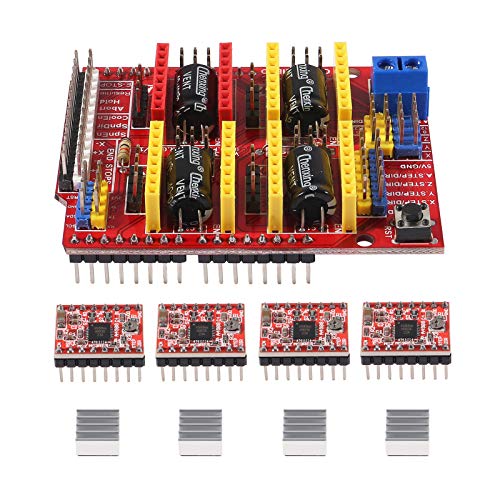
ACEIRMC CNC Shield V3 with 4× A4988 Stepper Drivers
Plug-in stepper control for an Arduino UNO: one shield, four A4988 drivers, four heatsinks.
Best for: Stepper SCARA, delta & 3-axis arms

BIGTREETECH TMC2209 V1.3 Stepper Motor Driver
Quiet, smooth stepper drivers — the upgrade when A4988s make your arm whine and vibrate.
Best for: Quiet, smooth stepper joints
Other boards you’ll see recommended
A few other boards come up often. They’re capable, but they aren’t in our shop, so we don’t pick between them here:
- STM32 boards show up in advanced builds that want more real-time control and can handle a steeper toolchain.
- Teensy 4.x suits experienced makers doing demanding real-time work.
- Raspberry Pi Pico (RP2040) is a small microcontroller from Raspberry Pi, popular for MicroPython projects. Despite the name, it’s a microcontroller, not a Linux computer like the Pi 5.
- Arduino Uno R4 is the newer generation of the Uno.
For a first or second robot, the four boards above cover nearly every build in our robotic arm projects list. All of them are in microcontroller boards.
Frequently asked questions
What is the best microcontroller for robotics for a beginner?
An Arduino Uno R3 or a compatible board like the ELEGOO UNO R3. Its 5V logic matches most modules, it has the most arm tutorials, and it's what our Arduino arm guide uses. Move to an ESP32 for wireless control, or a Mega when you need lots of sensors.
Is a Raspberry Pi a microcontroller?
No. It's a single-board computer that boots Linux. It's great for vision and Python, but its timing isn't guaranteed the way a microcontroller's is, so pair it with a PCA9685 servo driver or an Arduino/ESP32 for the motors.
Arduino or Raspberry Pi for a robotic arm?
Use an Arduino or ESP32 for a servo or stepper arm that moves on command or plays back recorded moves. Add a Raspberry Pi when you want a camera, object detection or ROS 2. Many advanced builds use both: the Pi plans, the microcontroller moves.
How many servos can an Arduino Uno control?
Its six PWM pins aren't the ceiling. With a PCA9685, the Uno drives 16 servos over the two-wire I2C bus, and the listing says drivers can be chained up to 62 boards. In practice the limit is your external servo power supply.
Is the ESP32 better than Arduino for robots?
It's faster and has Wi-Fi and Bluetooth built in, which makes it the best choice for phone- or web-controlled robots. The trade-offs are 3.3V logic, a noisy ADC, boot-pin caveats and fewer beginner arm tutorials than the Uno.
Can I power servos from the Arduino 5V pin?
Only a single micro servo for testing. For an arm, use a separate 5–6V supply, such as a 5V 10A adapter or a buck converter from a battery pack, and connect its ground to the board's ground.