If an Arduino, ESP32 or Raspberry Pi does the thinking in your robot arm, hexapod or animatronic, get a 16-channel PCA9685 I²C driver. Chain two and you can run up to 32 servos. Choose a standalone USB controller such as the Pololu Maestro only if motion should run from a PC or a stored script with no microcontroller. Choose a serial-bus adapter only for smart servos, which PWM boards can’t drive.
This guide is organized by job, not as a ranked list of near-identical PCA9685 clones. Details come from manufacturer listings and published spec summaries; we haven’t hands-on tested every board. Once you’ve picked a board, our PCA9685 wiring and code guide covers setup.
As an Amazon Associate we earn from qualifying purchases. Prices and availability are accurate as shown on Amazon at the time of purchase.

HiLetgo PCA9685 16-Channel PWM Servo Driver
16 channels of 12-bit PWM over I²C, with a separate V+ terminal for servo power. It works with the Adafruit PCA9685 library most tutorials use and drives a 4–6 DOF arm from two signal wires. Suits a first multi-servo build.
Best for: Any arm with 3+ servos

SunFounder PCA9685 16-Channel Servo Driver
The same 16-channel, 12-bit PCA9685 chip over I²C, sold for both Arduino and Raspberry Pi. Suits a Python-driven Pi arm.
Best for: Raspberry Pi arms

HUAREW PCA9685 16-Channel PWM Driver (2-Pack)
Two chainable 16-channel boards give you 32 channels on one I²C bus. On a smaller build, the second board is a spare.
Best for: Large or dual-arm builds
Quick answer: which servo controller board for which build
- Arduino or ESP32 driving 1–16 standard servos: a PCA9685 16-channel I²C board such as the HiLetgo PCA9685. Two signal wires from your microcontroller, sixteen servo outputs.
- Raspberry Pi arm: the SunFounder PCA9685, sold for both Arduino and Raspberry Pi. A plug-on PCA9685 HAT also works if you only run small servos.
- 17–32+ servos (hexapod, dual-arm): chain two or more PCA9685 boards on one I²C bus. The HUAREW 2-pack gives you 32 channels.
- No microcontroller, motion recorded and played back from a PC (animatronics, props): a standalone USB servo controller such as the Pololu Maestro.
- Smart servos with feedback (Feetech STS/SCS, Hiwonder bus servos): a serial-bus adapter that matches your servos. A PWM driver will not work with them.
Whichever board you pick, the servos need their own power supply. That’s where most multi-servo builds go wrong, so the power section below is worth reading before you wire anything.
Servo controller board types compared
| Board type | Example | Channels | Interface | Needs a microcontroller? | Speed/accel control | Onboard sequences | Servo type |
|---|---|---|---|---|---|---|---|
| I²C PWM driver | PCA9685 (HiLetgo, SunFounder, HUAREW) | 16 per board; up to 62 boards chained | I²C | Yes | No (handled in your code) | No | Standard 3-wire PWM servos |
| Standalone USB/serial controller | Pololu Mini Maestro 12 | 12 (Maestro range: 6–24) | USB, TTL serial | No | Per channel | Yes (internal scripting) | Standard PWM servos |
| Standalone USB controller | Phidgets 16x RC Servo Phidget | 16 (PhidgetAdvancedServo: 8) | USB / VINT | No (runs from a computer) | Velocity and acceleration | — | RC servos |
| Serial-bus adapter | ST/SC Serial Bus Servo Driver Board | Up to 253 servo IDs | USB, UART | No (PC over USB or MCU over UART) | — | — | ST/SC serial-bus servos only |
| All-in-one board | Yahboom 24-channel servo board | 24 | Bluetooth 4.0, serial, app, wireless handle | No (onboard STM32) | — | — | PWM servos |
Do you even need a servo controller board?
Not always. One or two small servos can run straight from a microcontroller pin; our Arduino servo motor control guide shows how. A board earns its place at three or more servos.
Three things get harder as you add servos:
- Pins. A microcontroller has only a handful of hardware PWM outputs, and every servo needs its own signal.
- Timing. When the microcontroller generates every pulse in software, the signal depends on your code keeping up. While it’s busy with other work, servos can jitter.
- Power. Several servos starting at once draw a current spike. On a shared supply, that spike can pull the voltage low enough to reset the board.
A dedicated driver fixes the first two directly. The PCA9685 has its own free-running clock: after one I²C command, it keeps sending that pulse until told otherwise, leaving your code free for other work.
It also has a separate V+ terminal, so servo current no longer flows through your microcontroller. That only solves the power problem if a proper supply is connected to V+.
Already seeing jitter or random resets? Our robotic arm troubleshooting guide walks through the usual causes.
The four types of servo controller board
1. I²C PWM driver (PCA9685)
The PCA9685 only generates the signal. It has 16 PWM outputs with 12-bit (4096-step) resolution and does no processing of its own, so it needs a microcontroller or a Raspberry Pi to tell it what to do. It’s simple, widely supported and chainable: up to 62 boards can share one I²C bus using address jumpers.
2. Standalone USB/serial controller (Pololu Maestro, Phidgets)
These boards have their own processor. The Pololu Maestro range spans 6 to 24 PWM channels over USB and serial. Published spec summaries of the Mini Maestro 12 list per-channel speed and acceleration limits, plus internal scripting that runs stored sequences with no PC or microcontroller attached.
Phidgets makes USB servo controllers, including the 16x RC Servo Phidget and the 8-motor PhidgetAdvancedServo. They control position, velocity and acceleration, with APIs for Python, JavaScript and Java.
Pick this type when motion is choreographed or driven from a computer rather than from a robot’s own code.
3. Serial-bus “smart servo” adapter
Smart servos don’t use PWM. Each servo has an ID, and many share one data line. The adapter connects that bus to your computer or microcontroller and reads telemetry back from each servo. It only works with its matching family of bus servos. PWM drivers and serial-bus adapters are not interchangeable.
4. All-in-one boards with their own processor
Some kit makers combine a processor with many servo outputs. Yahboom’s 24-channel PWM servo board, for example, uses an STM32F103RCT6, drives 24 servos and offers Bluetooth 4.0, a wireless handle, a serial port and app control. Boards like this make most sense with the kits they were designed for. For a custom build, pick one of the first three types.
PCA9685 vs Pololu Maestro: head-to-head
The practical difference comes down to one question: does a microcontroller do the thinking in your project? The comparison table on this page sets both side by side with the other board types.
PCA9685: the signal generator
16 channels per board over I²C, 12-bit resolution (4096 steps), duty cycle from 0 to 100%. Output frequency is programmable from 24 Hz to 1526 Hz and shared by all channels, so standard 50 Hz servo signals sit well inside the range.
There’s no speed or acceleration control and no stored sequences. Smooth motion, easing and sequencing live in your Arduino, ESP32 or Python code. You expand by chaining, up to 62 boards on one bus.
Pololu Maestro: the self-contained controller
The Maestro family spans 6 to 24 channels with onboard processing. Published spec summaries of the Mini Maestro 12 describe:
- connection over USB or TTL serial
- speed and acceleration limits set per channel
- internal scripts, so a stored sequence plays with no PC or microcontroller attached
- spare channels that can serve as digital outputs or analog inputs
You can still send it commands from a microcontroller over serial.
Verdict
Use a PCA9685 when the robot’s own code decides where each joint goes: an arm running inverse kinematics, a camera loop or a Python script.
Use a Maestro-type controller when you’re choreographing a prop or animatronic that should run on its own. It saves you writing timing and easing code. For PC-first projects in Python, JavaScript or Java, Phidgets’ USB controllers are the other option.
Smart servo controllers (serial-bus): when feedback matters
Smart servos such as the Feetech STS3215, used in the LeRobot SO-ARM100/101 arms, don’t accept a PWM signal. A PCA9685 can’t drive them; they need a serial-bus adapter.
What a bus driver board does
DFRobot’s listing for a Serial Bus Servo Driver Board is a typical example. It addresses up to 253 ST/SC series servos, connects over USB or UART, takes a 9–12.6V DC supply, and supports telemetry feedback and ID programming.
That supply range sits well above the 4.8–6V hobby PWM servos commonly run at. Don’t reuse a 5V servo supply; match the supply to the servo datasheet.
A common setup mistake: Seeed’s Bus Servo Driver Board needs a jumper set for USB or direct UART use. If the board doesn’t respond, check that jumper first.
Hiwonder bus servos use Hiwonder’s own hardware. The BusLinker V3.0 debugging board, for example, takes a 5–14V input for Hiwonder’s magnetic-encoder bus servos. Feetech-style and Hiwonder servos need different adapters, so get the one made for yours.
Is feedback worth it?
With feedback, the controller reads back what each servo is doing instead of assuming it reached the commanded position. That matters for closed-loop control and imitation learning; our encoders and feedback guide explains why. For a hobby arm that simply repeats moves, standard PWM servos on a PCA9685 are simpler.
Arms built around bus servos
Want feedback without assembling a bus system yourself? Start from an arm built around one.
The Hiwonder xArm ESP32 uses serial bus servos with feedback and an ESP32 programmed in MicroPython. It supports app, mouse, handle and wireless-glove control, and the listing quotes a 25 kg base servo. It suits someone learning closed-loop control and MicroPython on a real arm. Skip it if you want to choose your own servos and electronics.
The Seeed Studio SO-ARM101 is a 6-DOF arm for the open-source LeRobot ecosystem, NVIDIA Jetson compatible and aimed at AI and imitation-learning work. Printed parts aren’t included, so it suits makers who own a 3D printer. Skip it if you want an arm that works out of the box. Check the listing for exactly which electronics are included.
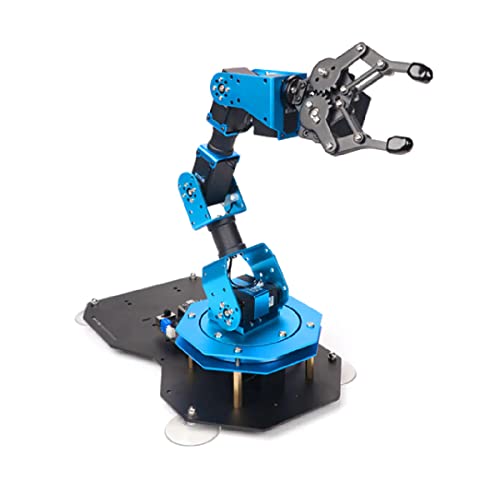
Hiwonder xArm ESP32 Robotic Arm (MicroPython)
An open-source ESP32 arm with feedback-capable bus servos, programmable in MicroPython.
Best for: Learning closed-loop control and MicroPython on a real arm

Seeed Studio SO-ARM101 6-DOF AI Robotic Arm
Low-cost open-source LeRobot arm for AI / imitation-learning projects — compatible with NVIDIA Jetson.
Best for: AI & machine-learning builds
Best PCA9685 servo driver boards (our picks)
All three picks use the same PCA9685 chip: 16 channels of 12-bit PWM over I²C. They differ in pack size and in which platforms the seller targets.
HiLetgo PCA9685: best all-round board for Arduino and ESP32
The HiLetgo PCA9685 has a separate V+ terminal for servo power and works with the Adafruit PCA9685 library most Arduino and Pi tutorials use. Two I²C signal wires drive every joint of a 4–6 DOF arm. It’s the driver in our PCA9685 guide and our ESP32 robotic arm guide, which also covers 3.3V logic wiring.
Good fit: a first multi-servo build on Arduino or ESP32, up to 16 standard servos. Skip it if: you need more than 16 channels from day one (take the 2-pack) or your servos are serial-bus types.
SunFounder PCA9685: best for Raspberry Pi arms
The SunFounder PCA9685 is sold for both Arduino and Raspberry Pi, which makes it a natural fit for a Python-driven Pi arm. Our Raspberry Pi robotic arm guide shows how it fits alongside vision and a web interface.
Good fit: Pi builds where you want the servo board on wires rather than stacked on the header. Skip it if: you want a plug-on HAT. Waveshare’s Servo Driver HAT, for example, sits on the Pi’s 40-pin header; its onboard 5V regulator is rated up to 3A shared across all servos, so it only suits small servos.
HUAREW PCA9685 2-pack: best for 17–32 servos or a spare
The HUAREW 2-pack gives you two chainable 16-channel boards. Set a different address on one and you have 32 channels on one I²C bus: enough for an 18-servo hexapod or a dual-arm robot. On a smaller build, the second board is a spare.
Good fit: hexapods, dual arms, or several builds at once. Skip it if: you’re building one small arm and don’t want a spare.
Clones vs the Adafruit original
Most PCA9685 boards are clones of the Adafruit layout. The Adafruit board adds:
- reverse-polarity protection on V+
- 220 Ω series resistors on the outputs
- 3.3V/5V-tolerant logic
- six address jumpers
Clones vary. Some omit reverse-polarity protection, and build consistency and capacitor quality differ. None of our picks is the Adafruit original, so double-check polarity before connecting power to V+.
What to check on the listing
- Headers: fitted or loose. Loose means soldering.
- Address jumpers: needed if you’ll ever chain boards.
- V+ terminal: servo power, separate from logic power.
- Capacitor footprint: bulk capacitor fitted, or empty pads.
- Pack quantity: single board or multi-pack.
How many channels do you need (and how to go past 16)
Count every joint, the gripper and any pan/tilt camera mount, then add a couple of spares. Our degrees of freedom guide helps if you’re still deciding how many joints your arm needs.
- 4–6 DOF arm with gripper: one 16-channel board, with room to spare.
- Arm plus pan/tilt camera: still one board.
- Hexapod (18 servos) or dual-arm robot: two boards, 32 channels.
To go past 16, chain PCA9685 boards on the same I²C bus and give each a different address with its jumpers. In theory that allows 62 boards and 992 outputs. In practice, power and wiring limit you long before addresses do.
The HUAREW 2-pack is the simplest route to 32 channels; our PCA9685 guide covers the wiring and code. More driver boards are on the controllers shop page.
Powering a servo controller board (the part everyone gets wrong)
A servo controller board does not power the servos. A PCA9685 only generates the control signal. The servos run from whatever supply you connect to V+, and that supply must handle their combined stall current. The full method is in how to power a robotic arm; here’s the short version.
Size the supply
Multiply the number of servos by each servo’s stall current from its datasheet. A single MG996R can pull 2A or more, so four can draw 8A or more at the worst moment. Haven’t chosen servos yet? Size them first with the robot arm torque calculator and our servo selection guide.
Use a dedicated supply and share ground
Hobby servos commonly run at 4.8–6V, so a dedicated 5V supply is the simple choice. The ALITOVE 5V 10A supply suits a separate rail for 4–6 servos. It delivers 50W, accepts 100–240V AC and has a 5.5 × 2.5 mm barrel plug. With MG996Rs, check the math: five at 2A each already reach 10A.
Connect the supply’s ground to the microcontroller’s ground, and never run servos from the Arduino’s 5V pin. The robotic arm wiring diagram shows the full layout with a common ground.
Add a bulk capacitor
A bulk electrolytic capacitor across V+, close to the board, smooths the current spikes when several servos start at once. Clone PCA9685 boards include a footprint for one, and capacitor quality varies between clones, so fitting your own is cheap insurance.
The HiLetgo electrolytic capacitor kit covers 24 values from 0.1µF to 1000µF in a storage box. It suits anyone who wants a stock of values on the bench. Electrolytics have polarity, so double-check which lead goes to ground.
Stepping down from a higher-voltage source
Running from a battery or a higher-voltage supply? A buck converter steps it down to your servos’ rating. The Teyleten LM2596 5-pack takes 4–40V in and outputs an adjustable 1.25–37V, with a built-in LED voltmeter for setting the output.
Each module is rated 2A continuous (3A peak). That suits a few small servos or a logic rail, not a bank of MG996Rs. For heavier loads, split the servos across several modules or use a bigger supply.
Two limits that catch people out
- Board current. Budget boards have thin traces and small terminals. Heavy builds may need separate power distribution that feeds the servos directly rather than through the board.
- Servo voltage. Some board listings allow a higher V+ than most servos are rated for. Match the supply to the servos, not to the board’s maximum.
Supplies and converters are collected on our power shop page.

ALITOVE 5V 10A Power Supply Adapter (50W)
A dedicated 5V, 10A servo supply — the fix for arms that brown out and reset the Arduino.
Best for: Separate power rail for 4–6 servos

HiLetgo Electrolytic Capacitor Assortment Kit (500pcs, 0.1uF–1000uF)
Includes the 1000µF capacitors that stop servo current spikes from resetting your board.
Best for: Smoothing the servo power rail

Teyleten Robot LM2596 Buck Converter w/ LED Voltmeter (5-Pack)
Adjustable 4–40V → 1.25–37V regulators with a built-in voltmeter — dial in 6V for your servos.
Best for: A clean 5–6V servo rail
Frequently asked questions
What is the difference between a servo driver and a servo controller?
The terms are often used interchangeably. A useful distinction: a driver such as the PCA9685 just generates pulses when a microcontroller tells it to, while a controller such as the Pololu Maestro has its own processor and can store and run motion sequences.
Can a PCA9685 control smart or serial-bus servos?
No. Serial-bus servos such as the Feetech STS/SCS series or Hiwonder bus servos need a matching serial-bus adapter. A PCA9685 drives standard 3-wire PWM servos such as the SG90 and MG996R.
How many servos can one PCA9685 control?
16 per board, and up to 62 boards can be chained on one I²C bus using address jumpers. In practice, power and wiring limit you long before channels do.
Can I power servos from the Arduino 5V pin through the driver?
Not for anything beyond a micro servo or two. Connect a separate supply to the board's V+ terminal, join its ground to the Arduino's ground, and add a bulk capacitor across V+.
Do I need a microcontroller with a Pololu Maestro?
No. According to published spec summaries, a Maestro can be controlled from a PC over USB or run its internal script with nothing attached. It also accepts TTL serial commands from a microcontroller if you want one in the loop.
Which servo controller board is best for Raspberry Pi?
A PCA9685 board over I²C, such as the SunFounder board sold for both Arduino and Pi, or a plug-on PCA9685 HAT. A HAT's onboard regulator is shared by all servos (Waveshare's is rated up to 3A), so a HAT only suits small servos.