
ELEGOO UNO R3 Super Starter Kit
One of the best-selling UNO starter kits: board, servo, stepper, LCD and guided lessons, no soldering.
Best for: Complete beginners heading toward a robotic arm

by ELEGOO
★ Best for: Electronics beginners
Mega board plus breadboard, jumpers, sensors and a tutorial — everything to prototype an arm’s electronics.
Opens Amazon in a new tab — current price & reviews are shown there.
As an Amazon Associate we earn from qualifying purchases. Prices and availability are accurate as shown on Amazon at the time of purchase.
More than a board: this starter kit bundles the Mega 2560 with a breadboard, jumper wires, resistors, sensors and a step-by-step tutorial. For a first robotic-arm build it removes the "I’m missing one wire" friction — you can prototype the control circuit, test servos and read sensors before committing to a soldered layout. A genuinely good value entry point if you are new to electronics as well as to robotic arms.
| Board | Mega 2560 (ATmega2560) |
|---|---|
| Includes | Breadboard, jumpers, sensors, components |
| Tutorial | Yes (beginner) |
| IDE | Arduino-compatible |
ELEGOO Mega 2560 Complete Starter Kit
See the current price, stock and reviews on Amazon.
Build a 4-DOF Arduino robotic arm with hobby servos. Full parts list, wiring diagram, power tips and copy-paste Arduino code to control it with potentiometers or serial commands.
Start hereLearn how to build a robotic arm from scratch — the parts, degrees of freedom, wiring and code you need, plus a clear path from your first servo to a working 6-axis arm.
Code & electronicsCopy-paste Arduino robotic arm code: Servo library setup, sweep tests, potentiometer and serial control, record/playback, smooth motion, and PCA9685.
One of the best-selling UNO starter kits: board, servo, stepper, LCD and guided lessons, no soldering.
Best for: Complete beginners heading toward a robotic arm

ELEGOO's biggest UNO kit — 200+ components and 30+ projects, including a servo, stepper and RFID.
Best for: Beginners who want a big parts library for later projects
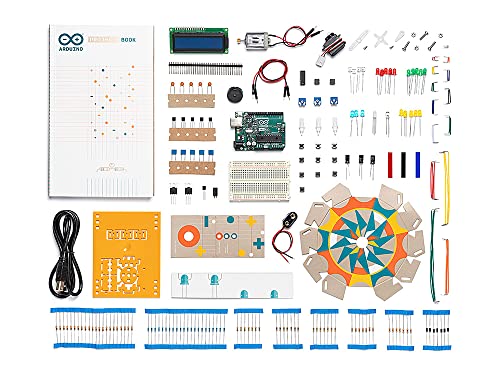
The official kit from Arduino with a printed project book and 12 guided projects.
Best for: Classrooms and learners who want the official book
ELEGOO Mega 2560 Complete Starter Kit
Check Price on Amazon